
WSU Student Portal Login 2027: Complete Guide to Register And Reset PIN
WSU Student Portal Login 2027. The WSU Student Portal Login is the official online system for Walter Sisulu University (WSU) students. It allows students to register for modules, check academic results, view fee statements, apply for residence, download proof of registration and update personal information from one secure platform.
Instead of visiting different university offices, students can complete most academic tasks online through the WSU iEnabler portal. Whether you are a new student or a returning student, learning how to use the portal correctly can save time and help you avoid missing important registration or payment deadlines.
In this guide you’ll learn everything about the WSU Student Portal Login including the official login links, step by step login instructions, PIN recovery, common login problems and the main features available inside the portal.
Quick Answer
Students can log in to the official WSU Student Portal through the WSU iEnabler portal using their Student Number and iEnabler PIN.
- Official Login Portal: https://ienabler.wsu.ac.za/pls/prodi41/w99pkg.mi_login
- Alternative Login Portal: https://ieweb.wsu.ac.za/pls/prodi41/w99pkg.mi_login
If you forget your PIN, you can reset it using the official PIN recovery page: https://status.wsu.ac.za/reset/index.php
What Is the WSU Student Portal?
The WSU Student Portal is Walter Sisulu University’s official online self service platform. It is designed to help students manage their academic and financial activities without visiting the campus for every service. The portal is powered by the iEnabler system, which is used by several universities in South Africa for student administration.
After receiving your student number from WSU, the Student Portal becomes your main account throughout your studies. Using the portal, students can:
- Register for modules
- View examination results
- Download proof of registration
- Check fee statements
- View payment history
- Apply for residence
- Update personal details
- Access academic records
- Monitor registration status
Everything is available in one place, making it easier to manage your university life.
Official WSU Student Portal Links
Below are the official Walter Sisulu University online portals.
| Portal | Official Link |
|---|---|
| WSU Student Portal (iEnabler) | https://ienabler.wsu.ac.za/pls/prodi41/w99pkg.mi_login |
| Alternative Login | https://ieweb.wsu.ac.za/pls/prodi41/w99pkg.mi_login |
| PIN Recovery | https://status.wsu.ac.za/reset/index.php |
| Application Status | https://status.wsu.ac.za/status/statuscheck.php |
| Online Application | https://applications.wsu.ac.za |
| Official Website | https://www.wsu.ac.za |
Tip: Save the primary iEnabler login page in your browser. During registration periods, the main website may become slow due to heavy traffic.
What You Need Before Logging In
Before opening the login page, make sure you have the following information ready.
Student Number
This is your official WSU student number issued after your application is accepted. You can usually find it on:
- Admission letter
- Registration documents
- Official WSU emails
- Student records
Remember that your student number is different from your application reference number.
iEnabler PIN
- Your PIN is used only for the WSU Student Portal.
- It is different from your email password or any other university password.
- If you do not know your PIN, you can request a new one through the login page.
How to Login to the WSU Student Portal
Logging in is simple if you follow these steps carefully.
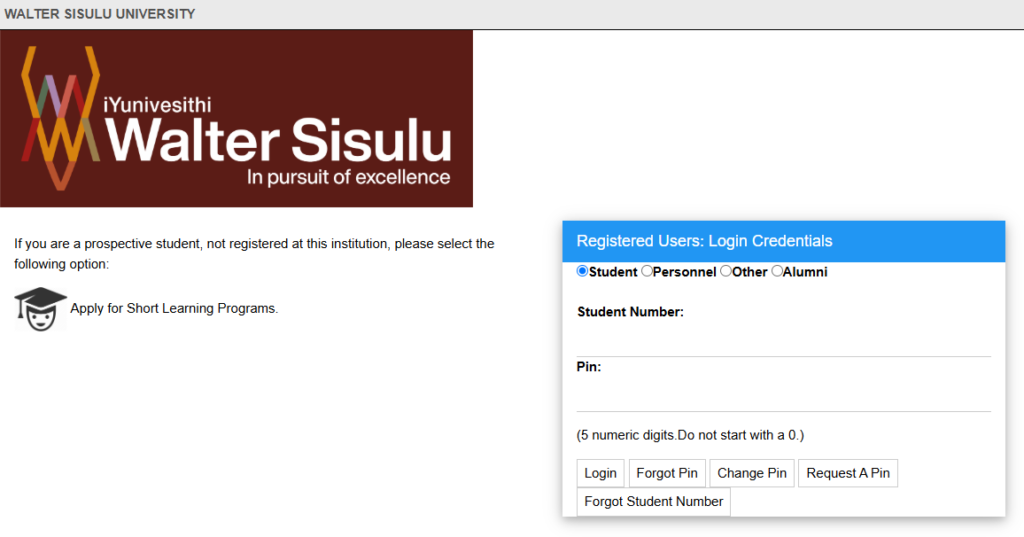
Step 1: Visit the Official Portal
Open your preferred browser such as:
- Google Chrome
- Mozilla Firefox
- Microsoft Edge
Go to the official “WSU Student Portal”.
Step 2: Select Student
On the login page, select Student from the available user options. Choosing another user type may prevent you from logging in.
Step 3: Enter Your Student Number
Type your complete student number without spaces. Always double check the number before continuing.
Step 4: Enter Your PIN
- Type your iEnabler PIN carefully.
- If you forgot your PIN, click Request PIN.
- The system will send a new PIN to your registered email address.
Step 5: Click Login
Click the Login button. After successful login, your dashboard will open where you can access all available student services.
Main Features of the WSU Student Portal
The WSU Student Portal brings together all important student services in one place.
Academic Registration
Students can:
- Register for modules
- Accept university rules
- Confirm registration
- Save registration progress
- Complete semester registration
Check Results
The portal allows students to:
- View semester results
- Check examination marks
- View yearly results
- Download academic records
Results become available once they are officially released by the university.
Fee Statements
Students can easily manage their finances online. Inside the portal you can:
- View tuition fees
- Check payment history
- Download fee statements
- See outstanding balances
- Verify NSFAS payments
- Check bursary updates
Proof of Registration
Students can instantly download their official Proof of Registration in PDF format. This document is often required for:
- NSFAS
- Bursaries
- Student card collection
- Banking purposes
- Accommodation applications
Always check that your personal details and registered modules are correct before downloading.
Residence Applications
Students living on campus can:
- Apply for university residence
- Track application status
- Complete residence registration
- Confirm accommodation details
Update Personal Information
Students should always keep their contact information updated. You can update:
- Mobile number
- Email address
- Contact details
Keeping your email updated is important because PIN recovery messages are sent to your registered email account.
Academic Records
Students can also access:
- Academic history
- Registered modules
- Qualification details
- Previous semester records
- Official academic transcript
These documents are useful when applying for scholarships, internships, or further studies.
Why the WSU Student Portal Is Important
The WSU Student Portal helps students complete most university tasks without standing in long queues or visiting campus offices. Using the portal correctly allows you to:
- Register on time
- Avoid missing deadlines
- Access results quickly
- Monitor your fees
- Download important documents anytime
- Stay informed throughout the academic year
For many students, the portal becomes the main place to manage their university journey from admission until graduation.
How to Register Online Through the WSU Student Portal
Walter Sisulu University allows students to complete their registration online through the iEnabler portal. The process is simple if you follow each step carefully.
Step 1: Log In to the Portal
Visit the official “WSU Student Portal” and sign in using your:
- Student Number
- iEnabler PIN
After logging in, your dashboard will appear.
Step 2: Open Academic Registration
- From the left side menu, click Academic Registration.
- The system will first check if there are any registration restrictions on your account.
- If a restriction appears, read the message carefully before continuing.
Step 3: Accept Rules and Regulations
- Before registering your modules, WSU requires every student to accept the university’s Rules and Regulations.
- Read the information and click I Accept.
- This acts as your electronic agreement.
Step 4: Select Your Modules
Choose the modules for your qualification. The portal may display warning messages if:
- A prerequisite module is missing.
- A module is already completed.
- Your faculty has placed a restriction on your registration.
Review your subjects carefully before moving to the next page.
Step 5: Accept Your Registration
- This is the most important step.
- Many students click Save and Continue but forget to click Accept Registration.
- Saving your registration does not complete the process.
- You are officially registered only after clicking Accept Registration.
Step 6: Download Proof of Registration
After registration is complete:
- Open Proof of Registration
- Download the PDF
- Save it on your phone or computer
Check that it shows:
- Your name
- Student number
- Qualification
- Registered modules
- Academic year
- Campus
If any information is incorrect, contact your faculty immediately.
How to Reset Your WSU Student Portal PIN
Forgetting your PIN is one of the most common login problems. Fortunately, resetting it only takes a few minutes.
Method 1: Request a New PIN
On the login page:
- Click Request PIN
- Enter your Student Number.
- Follow the instructions.
- A new PIN will be sent to your registered email address.
Remember to check your:
- Inbox
- Spam folder
- Junk folder
Method 2: Use the Official PIN Recovery Tool
If you cannot receive emails use the official recovery page. You will need:
- Student Number
- ID Number or Passport Number
- Full Name
If the information matches your student record, your PIN will be displayed immediately.
How to Recover a Forgotten Student Number
If you cannot remember your student number don’t worry. You can recover it by checking:
- Your WSU admission letter
- Registration documents
- Previous WSU emails
- SMS from the university
If you still cannot find it, check your application status using your ID number or contact your campus admissions office.
Who Can Use the WSU Student Portal?
The portal is available for different types of users.
New Students
Students who have received admission can use the portal to complete registration, request their PIN, and access academic services.
Returning Students
Returning students use the portal every semester to register for subjects, check results, and manage their accounts.
Postgraduate Students
Master’s and PhD students can also use the portal to manage registration and academic records.
Applicants
Applicants can check their application status through the official application status portal before receiving their student number.
Common WSU Student Portal Login Problems and Solutions
Most login problems have simple solutions.
Incorrect PIN
Problem
- The system says your PIN is incorrect.
Solution
- Request a new PIN instead of guessing repeatedly.
- Too many failed attempts may temporarily lock your account.
Student Number Not Found
Problem
- The portal cannot find your student number.
Solution
- Make sure you are entering your Student Number, not your application reference number.
- These are two different numbers.
Portal Is Slow
Problem
- The website loads very slowly during registration.
Solution
Try again:
- Early in the morning
- Late at night
- Using Chrome
- Using the alternative iEnabler link
Heavy traffic during registration often causes delays.
Registration Not Completed
Problem
- You selected your modules, but registration is still incomplete.
Solution
- Return to the registration page and click Accept Registration.
- Only saving your modules does not complete registration.
Results Not Showing
Problem
- No examination results appear.
Solution
- Wait until results are officially released.
- Sometimes marks take time to update across all departments.
Fee Payment Not Updated
Problem
- Your payment is missing.
Solution
- Payments may take one or two business days to appear in the system.
- If the payment still does not appear, contact the finance office.
Modules Cannot Be Selected
Problem
- Some subjects cannot be selected.
Solution
Possible reasons include:
- Outstanding fees
- Academic restrictions
- Missing prerequisite modules
Check your registration restrictions or contact your faculty.
WSU Student Portal vs WSU Application Portal
Many students confuse these two systems.
| Feature | WSU Student Portal | WSU Application Portal |
|---|---|---|
| Purpose | Registration, Results, Fees | New Applications |
| Login | Student Number + PIN | Email + Password |
| Users | Current Students | New Applicants |
| Available | Throughout the Year | During Application Period |
Once you receive your student number, you will mainly use the WSU Student Portal.
Tips to Keep Your WSU Student Portal Secure
Protecting your account is very important. Follow these simple safety tips:
- Never share your Student Number or PIN.
- Always log out after using the portal.
- Avoid logging in on public computers.
- Do not save your PIN in notes or messaging apps.
- Change your PIN regularly.
- Reset your PIN immediately if you think someone has accessed your account.
WSU Contact Details
If you cannot solve your login issue, contact Walter Sisulu University directly.
| Campus | Contact Number |
|---|---|
| Mthatha Campus | +27 47 502 2100 |
| Butterworth Campus | +27 47 401 6000 |
| Buffalo City Campus | +27 43 702 9200 |
| Potsdam Campus | +27 43 708 5200 |
| Chiselhurst Campus | +27 43 709 4000 |
| +27 (0) 79 378 3102 | |
| Official website | https://ieweb.wsu.ac.za/pls/prodi41/w99pkg.mi_login |
You can also visit the official WSU website for additional support and announcements.
FAQs About WSU Student Portal
What is the WSU Student Portal?
Ans: The WSU Student Portal is the official online platform where Walter Sisulu University students can register for modules, check results, view fee statements, access the iEnabler system and manage their academic information.
How do I log in to the WSU Student Portal?
Ans: Visit the official iEnabler login page, enter your Student Number and PIN, then click Login.
I forgot my PIN. What should I do?
Ans: Click Request PIN on the login page or use the official PIN recovery tool to create a new PIN.
Can I register online through the WSU Student Portal?
Ans: Yes. Students can complete module registration, accept university rules, confirm registration and download proof of registration entirely online.
Can I check my results online?
Ans: Yes. After logging into the portal, open Student Inquiry and select Academic Results to view your marks.
Can I use the portal on my phone?
Ans: Yes. The WSU Student Portal is mobile friendly and works on Android phones, iPhones, tablets and laptops.
Is the WSU Student Portal available all year?
Ans: Yes. Students can access the portal throughout the academic year, although some services are only available during specific registration or results periods.
Conclusion
The WSU Student Portal Login is an essential tool for every Walter Sisulu University student. It provides quick access to registration, academic results, fee statements, residence applications, proof of registration and many other important student services.